SuperCollider is probably my favorite creative coding tool. Not because it's the easiest, but because it's one of the most quirky and interesting pieces of software I've ever used.
For a while I've been fascinated by the idea of generatively designing sounds in code. Instead of manually tweaking knobs until something sounds good, what if we could describe the recipe for a sound and let a program explore thousands of variations for us?
After studying James McCartney's famous FM Tones Factory example included with SuperCollider, I finally started understanding how powerful SuperCollider can be as a free generative sound design environment.
In this article we'll use a kick drum as our example. Kicks are relatively simple to synthesize, which makes them perfect for learning the workflow. The same ideas can later be applied to snares, basses, FM sounds, percussion, drones, and more— provided you have a reasonable understanding of the recipe behind the sound you're trying to create.
Step 1: Build a Working Kick Drum
Before we can generate variations, we need a kick drum that sounds good.
At its core, a synthesized kick drum is just a sine oscillator subjected to a rapid downward pitch sweep. The frequency starts high and quickly drops to a lower frequency, creating the familiar "thump" we associate with kick drums.
Many producers add extra ingredients:
- Clicks for transient attack
- Noise tails for texture
- Distortion for weight and aggression
- Filtering and EQ shaping
We'll keep things simple and focus on the pitch-swept sine wave.
Visualizing the Pitch Sweep
One useful trick is using Env.plot to visualize what
the frequency envelope is doing before we actually use it.
~kickenv = Env([480,10],[0.2]);
~kickenv.plot;
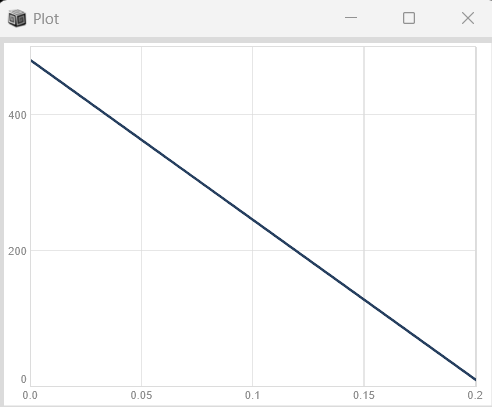
This gives us a linear sweep, but kick drums usually require something faster and more natural sounding.
~kickenv = Env([480,10],[0.2],curve:'exp');
~kickenv.plot;
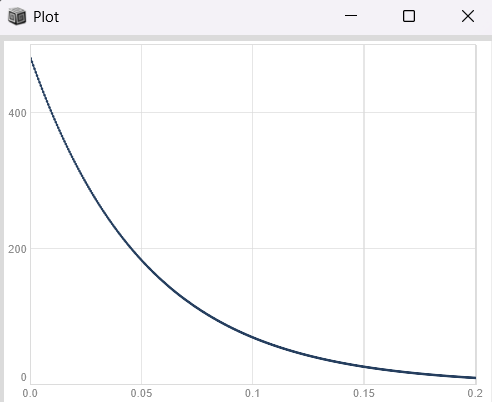
Or even better:
~kickenv = Env([480,10],[0.2],curve:-8);
~kickenv.plot;
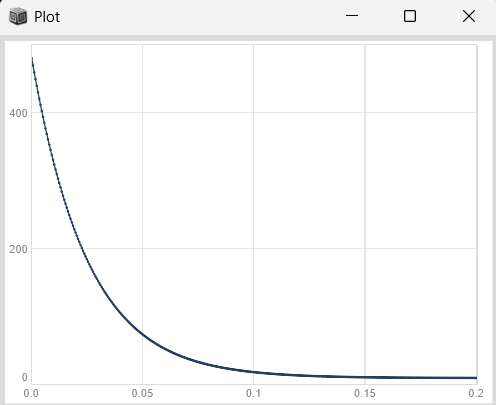
The negative curve gives us much finer control over the shape of the sweep.
Building the SynthDef
(
SynthDef("kick",{
    |sweepd =480,sweept=0.2,sat=2,
     filtfreq =120,filtres=1.0,
     dist =200,rel =0.5, amp=0.5|

    var sig,env,freq;

    freq = EnvGen.ar(
        Env([sweepd, 10], [sweept], -8)
    );

    env = Env.perc(0.0001,rel).ar(doneAction:2);

    sig = SinOsc.ar(freq) * env;

    sig = (sig * dist);

    sig = BLowShelf.ar(
        sig,
        filtfreq,
        filtres
    );

    sig = tanh(sig * sat);

    sig = sig * amp;

    Out.ar(0,sig!2);

}).store;
)
The important thing here is that every major characteristic of the kick
has been exposed as a parameter.
This makes the synth mutable and therefore suitable for exploration.
Note: Always write Args before declaring variables!
We can also rewrite it using namedcontrols instead of Synth Args.
(
SynthDef("kick",{

    var sig,env,freq;

    freq = EnvGen.ar(
        Env([\sweepd.kr(480), 10], [\sweept.kr(0.2)], -8)
    );

    env = Env.perc(
        0.0001,
        \rel.kr(0.5)
    ).ar(doneAction:2);

    sig = SinOsc.ar(freq) * env;

    sig = sig * \dist.kr(200);

    sig = BLowShelf.ar(
        sig,
        \filtfreq.kr(120),
        \filtres.kr(1.0)
    );

    sig = tanh(sig * \sat.kr(2));

    sig = sig * \amp.kr(0.5);

    Out.ar(0,sig!2);

}).store;
)
Step 2: Explore the Parameter Space
Now we manually move around the parameter space and listen for what works.
Synth(
    "kick",
    [
        \sweepd,120,
        \sweept,0.15,
        \sat,8,
        \filtfreq,620,
        \filtres,5.6,
        \dist,1,
        \rel,0.15,
        \amp,0.8
    ]
);
The goal isn't perfection. The goal is discovering the useful boundaries of the sound.
Step 3: Find Acceptable Ranges
After enough experimentation I arrived at rough ranges:
sweepd:   150 - 450
sweept:   0.1 - 0.3
sat:      2 - 8
filtfreq: 200 - 500
filtres:  0.1 - 1.0
dist:     2 - 8
rel:      0.2 - 1.0
Think of this as defining the search space for future kick drums.
Step 4: Build a Kick Drum Factory
Now comes the fun part.
Instead of designing one kick drum, we generate dozens automatically.
(
n = 60;

~kick = IdentityDictionary.new;

n.do { |i|

    ~kick[i] = (

        sweepd: exprand(100,450),
        sweept: exprand(0.1,0.3),
        sat: exprand(2,8),
        filtfreq: exprand(20,500),
        filtres: exprand(0.1,1.0),
        dist: exprand(1,8),
        rel: exprand(0.15,0.9)

    );

};
)
Notice the use of exprand().
For sound design, exponential distributions are often much more useful
than linear randomization because our perception of frequency, time,
and loudness tends to be logarithmic.
Auditioning Presets
Synth(\kick, ~kick[18].asKeyValuePairs);
You can also override parameters:
Synth(
    \kick,
    ~kick[12].asKeyValuePairs
    ++ [
        \sat,20,
        \rel,0.2
    ]
);
Cycling Through the Results
The easiest way to explore your generated sounds is by automatically cycling through them.
(
Tdef(\cyclethroughkicks, {

    n.do { |i|

        Synth(
            \kick,
            ~kick[i].asKeyValuePairs
        );

        0.51.wait;
    };

}).play;
)
When you hear something interesting, pause the routine and inspect
the parameters.
This makes sound design a quest in morphospace.
Generating Categories of Kicks
Randomness is powerful, but completely unconstrained randomness often produces unusable results.
A better strategy is dividing the search space into regions.
- Deep 808-style kicks
- Punchy classic kicks
- Aggressive industrial kicks
Each category gets its own parameter ranges.
It's great for creating sections in timbral quality.
For example, delineating TR-606s, 707s, 808s, 909s etc.
Further down the line:
- How do we make interesting and rich search morphospaces?
- How do we secure the bounds of separate morphospaces?
- Other patterns?